1
1. Pin Chrome Tab & Pick Element
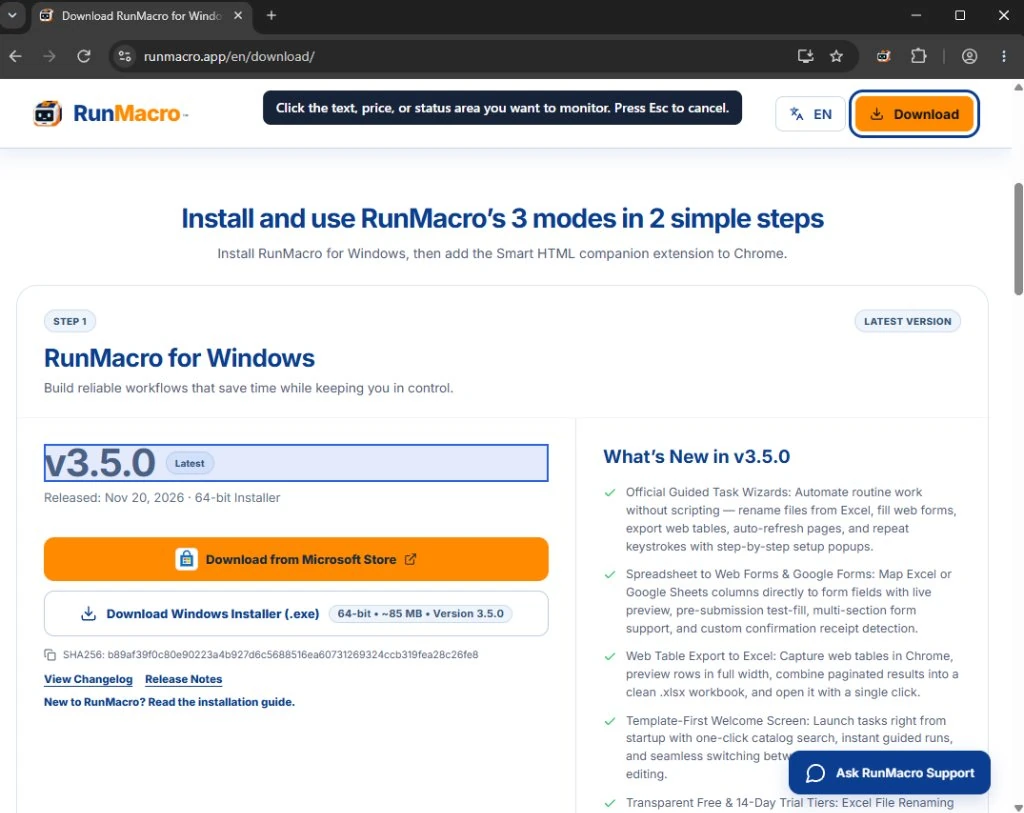
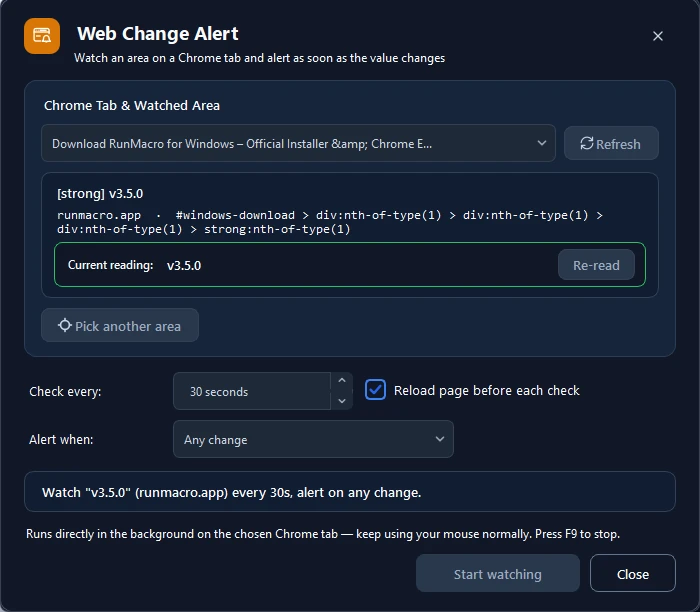
Select an open RunMacro-controlled Chrome tab and click the specific price, badge, stock text, or status cell via Smart HTML Explorer.
Stop hitting F5 waiting for stock availability, portal ticket updates, or dashboard status changes. Download RunMacro free and try the Web Change Alert guided template for 14 days: pin any Chrome tab element, poll every 5 to 3,600 seconds with optional page reload, and receive instant on-screen Before to After diffs plus a Windows sound alert.
14-day free trial (then Pro or Team) · 5-3,600s intervals · 3 alert rules · On-screen diff + sound beep
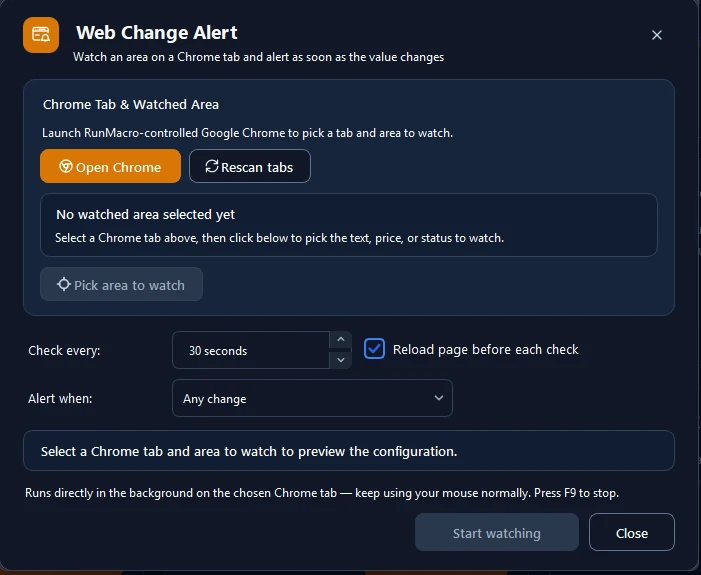
Attach to a Chrome tab, point to the exact text or price, and choose when to alert.
Select an open RunMacro-controlled Chrome tab and click the specific price, badge, stock text, or status cell via Smart HTML Explorer.
Set a poll interval from 5 to 3,600 seconds, enable Reload before check if needed, and pick Any Change, Contains Keyword, or No Longer Contains Keyword.
Keep RunMacro and the Chrome tab open. Whenever your rule triggers, RunMacro shows a Before to After diff banner and plays a Windows sound alert.
Works right inside authenticated Chrome tabs on your PC without handing passwords to third-party servers.
Check dynamic availability every 5 seconds during a critical release window or space checks up to once per hour while you work.
Alert on any text modification, when a target keyword appears (such as "In Stock"), or when a keyword disappears (such as "Sold Out").
Displays exact timestamped Before and After values directly inside the monitor panel so you see precisely what changed.
Plays a Windows notification sound alert alongside the on-screen alert card—ideal even if you step away from your monitor.
Toggle automatic Chrome tab refresh prior to reading static dashboards, or turn reload off when monitoring live WebSocket updates.
Verify your current element value immediately with Re-read before monitoring, or stop cleanly anytime with F9.
Your logged-in session stays strictly inside Chrome on your Windows PC.
Checks elements inside your own local Google Chrome tab via Smart HTML.
Keep working while RunMacro watches the pinned tab in parallel on your workstation.
Replace repetitive manual F5 tab refreshes while staying at your desk or nearby.
Monitor support ticket counters, deployment statuses, or order queues inside company web portals without refreshing by hand.
Watch when text changes away from "Full" or contains an available slot label while you work in other windows.
Track a specific product badge or price label inside Chrome and hear a sound chime the instant it matches your keyword rule.
Keep an eye on long-running web export jobs and get notified the moment status text flips to Ready.
Before walking away with sound alerts enabled, confirm these three details:
Make sure Current reading matches the visible text or price in Chrome—not an empty wrapper element.
Reload the page manually once to verify the selector still finds the element after refresh.
RunMacro triggers a local Windows sound alert; ensure your PC speakers or headphones are audible.
Designed for local Windows desktop monitoring via Chrome DevTools Protocol.
Per-check wait between 5 seconds and 1 hour, with optional reload before reading.
Monitors text differences, keyword appearance, or keyword removal accurately.
Timestamped Before to After card paired with Windows system sound notification.
Runs locally on Windows 10/11 (14-day free trial, then Pro or Team).
Transparent operating boundaries so you know exactly what local Chrome monitoring covers.
This tool runs locally on your Windows desktop. Closing the pinned Chrome tab, closing RunMacro, or putting Windows to sleep immediately pauses monitoring.
Web Change Alert provides local on-screen diffs and Windows sound alerts only—it does not run on remote cloud servers or send SMS, Telegram, or email notifications.
Chrome must be launched or connected through RunMacro Chrome CDP with the Smart HTML extension attached to inspect the page region.
Choose the right monitoring model for your portal and alert needs.
| Factor | RunMacro Web Change Alert | Manual F5 Refreshing | Cloud SaaS Website Monitor |
|---|---|---|---|
| Logged-In Chrome Portals | Yes (uses your open local Chrome tab) | Yes (manual) | Often blocked by logins or cookies |
| Requires PC Open | Yes (RunMacro + Chrome must stay open) | Yes (constant manual attention) | No (runs remotely 24/7) |
| Alert Delivery | On-screen Before to After diff + sound | Visual check only | Email / SMS / webhook notifications |
| Minimum Check Interval | 5 seconds locally | Manual effort | Typically 1 to 15 minutes on free tiers |
Honest answers on how local Chrome alerts, intervals, and trial access work.
No. Web Change Alert runs locally on your Windows computer using an open Chrome tab. Both RunMacro and the pinned Chrome tab must remain open while your PC stays awake.
No. The guided Web Change Alert task triggers an on-screen Before to After diff card inside RunMacro and plays a Windows system sound alert on your computer.
Because RunMacro reads directly from your active local Chrome tab via Chrome DevTools Protocol rather than fetching pages from an external cloud server without your session cookies.
You can set the check interval anywhere between 5 seconds and 3,600 seconds (1 hour), toggle Reload page before each check, and trigger on Any Change, New Value Contains Keyword, or No Longer Contains Keyword.
Downloading RunMacro is free for Windows 10/11 and includes a 14-day free trial of Browser/Chrome Smart HTML features, including the Web Change Alert template (web-change-alert). After the trial, Pro or Team is required.

Open Web Change Alert directly in RunMacro on Windows 10/11—pick a Chrome region, set your rule and interval, and hear an instant alert on change.