RunMacro
RunMacro Documentation
Create your first robot, then go further as needed.
Clear step-by-step guides to create, run, and improve robots for repetitive computer work.
Generate & Import Workflows with Custom GPT in RunMacro
Custom GPT Workflow allows authoring automation macros using natural language prompts on ChatGPT and importing them safely into RunMacro via the WorkflowImportCompiler.
Prerequisites#
- ChatGPT account to access RunMacro Custom GPT.
- Latest RunMacro desktop installation.
Supported modes#
- Desktop Mode — Compiles and imports Desktop RPA workflows safely.
- Browser Mode — Optimized for Chrome CDP web automation flows.
- RunMacro Runner — Allows instant execution post-import inside Runner.
What it does#
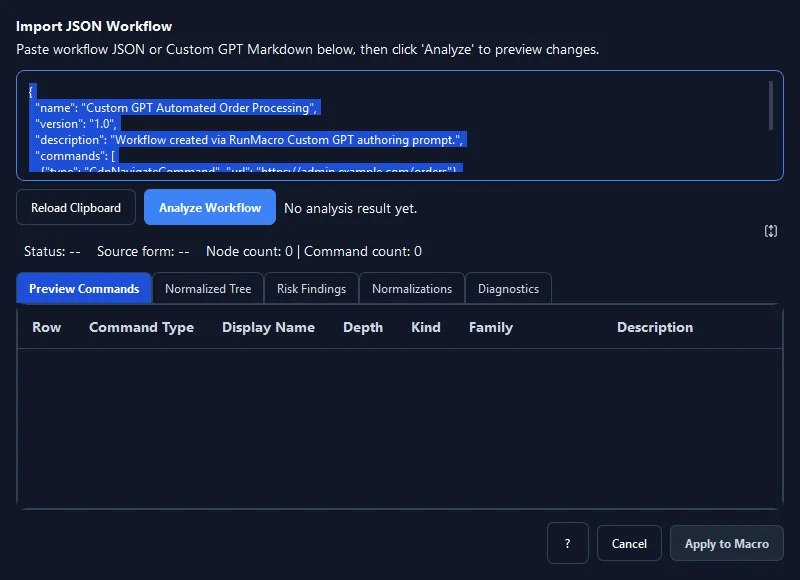
The Custom GPT Workflow feature bridges the reasoning power of the official RunMacro Custom GPT on ChatGPT with the safe, local WorkflowImportCompiler engine inside RunMacro. Simply describe your business workflow in natural language, and Custom GPT generates a verified JSON workflow schema. When pasted into RunMacro, the Workflow Import Dialog triggers multi-layered safety verification: validates schema syntax, flags risky actions (destructive file deletions or shell executions), normalizes duplicate labels, and displays an interactive preview before applying directly to your editor.
Screenshots & video#
When to use it#
- Quickly generating complex multi-step automation workflows from brief natural language prompts instead of manual drag-and-drop authoring.
- Converting Standard Operating Procedure (SOP) documentation into executable RunMacro workflows.
- Importing community or team-shared macro scripts through a secure validation gate.
- Learning macro authoring patterns by observing Custom GPT structure commands and error handling.
When not to use it#
- Trivial 1-2 click macros (faster to insert manually via the command sidebar).
Configuration steps#
- Open the official RunMacro Custom GPT on ChatGPT (or access via the Help menu link).
- Describe your desired automation in plain text (e.g. 'Open Chrome to CRM, download Excel report, and paste order IDs into accounting software').
- Custom GPT generates the validated RunMacro Workflow v1 JSON block.
- Click Copy on the generated workflow code block in ChatGPT.
- In RunMacro, navigate to File › Import Workflow from Custom GPT (Ctrl+I).
- The review surface appears: inspect commands in the Preview table and check safety diagnostics in the Risks tab.
- Click Apply to commit the entire workflow to your main editor table and begin execution.
Every option explained#
Expected result#
Complete macro workflow is cleanly parsed, safety-audited, and loaded ready-to-run into the RunMacro editor.
Real example#
Example: Generate web report download and filing workflow#
- Prompt Custom GPT: 'Create a macro to open https://erp.company.com, log in, click Export Report, and move file to D:\Reports'.
- Copy the generated JSON code block.
- In RunMacro, press
Ctrl+Iand paste the text. - Review the parsed 4-step workflow in the review pane.
- Click Apply — CdpNavigate, SmartClick, and MovePath commands are instantly loaded into the editor.
Limitations and failure cases#
- Complex custom web selectors generated by AI should be verified against live target DOMs.
Tips & common mistakes#
Verification details#
ui/workflow_import_dialog.py· verified 2026-09-30core/workflow_import_compiler.py· verified 2026-09-30