
Open an extension page in background Chrome (CDP)
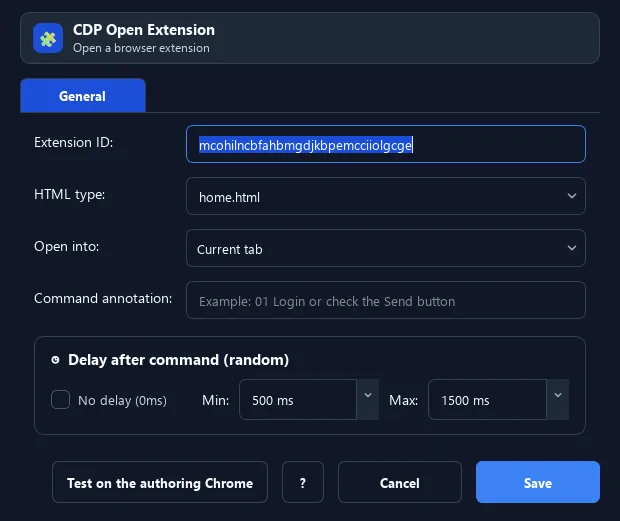
The Open Extension command navigates background Chrome to an extension internal page, of the form chrome-extension://<ID>/<path> (e.g.
Prerequisites#
- Add Open Extension to the macro.
- Prepare the data or target that Open Extension will use.
Supported modes#
- Browser Mode
What it does#
The Open Extension command navigates background Chrome to an extension internal page, of the form chrome-extension://<ID>/<path> (e.g. home.html, popup.html). Often used to open a wallet/extension UI and automate it.
Screenshots & video#
When to use it#
- Open an extension UI (crypto wallet, cookie helper…).
- Automatically go to an extension settings page.
- Prepare an extension page before clicking/typing.
When not to use it#
- Do not open an uninstalled/untrusted extension or without the correct Chrome profile and extension ID.
Configuration steps#
- Get the extension ID (in chrome://extensions with Developer mode on).
- Add Browser › Open Extension, enter the ID and the page path (default
home.html). - Choose current/new tab. Save.
Every option explained#
Expected result#
After execution, Open Extension completes the described action and makes its result available to the next step.
Real example#
Example: open a wallet UI#
- Open Extension with the wallet ID and path
home.html(new tab). - Delay 1500ms.
- Use Smart HTML to type the unlock password.
Limitations and failure cases#
- Extension ID, target URL, and profile permissions determine results; Chrome may not create a target if disabled.
Tips & common mistakes#
A wrong ID or an uninstalled extension leads to a blank/error page. Verify the ID in chrome://extensions first.
Verification details#
commands/browser.py