RunMacro Documentation
Create your first robot, then go further as needed.
Clear step-by-step guides to create, run, and improve robots for repetitive computer work.
Return Values and Exit Subflow Early (Return Subflow) in RunMacro
Return Subflow immediately exits the active subflow, evaluates declared return values, and yields execution control back to the calling workflow frame.
Prerequisites#
- The command must be placed inside a Subflow body never in the Main flow.
- The subflow has declared corresponding outputs if specific return values are to be evaluated.
- Source variables referenced in return expressions must exist and be valid when Return executes.
Supported modes#
- Desktop Mode — Exits the active desktop subflow frame and returns to the caller.
- Browser Mode — Exits the browser subflow frame without closing the underlying Chrome/CDP session.
- RunMacro Runner — The runner cleanly pops the local call frame and continues the caller sequence.
What it does#
The Return Subflow command is placed inside a Subflow body to immediately terminate subflow execution and evaluate output return values for the subflow's declared Outputs before returning control back to the caller. It is particularly powerful when nested inside conditional IF/ELSE blocks to handle early exit paths, error short-circuiting, or fast validation returns without executing the remaining commands of the subflow. Note that Return Subflow cannot be executed inside the Main flow.
Screenshots & video#
When to use it#
- Exiting early when encountering invalid arguments or unexpected conditions (e.g. IF {user} is empty -> Return {status} = "invalid_input").
- Short-circuiting out of subflow search loops as soon as a match is discovered (e.g. found matching item -> Return {found} = true).
- Explicitly assigning distinct output return values across multiple branching execution paths.
When not to use it#
- Placing directly in the Main flow because Main flow has no caller frame.
- Breaking out of a simple loop while wanting to keep executing subsequent subflow steps.
- Subflows that execute linearly to the end without branching early.
Configuration steps#
- Switch to the target Subflow tab (do not place in the Main flow).
- At the early exit point (typically within an IF block), add Control Flow › Return Subflow.
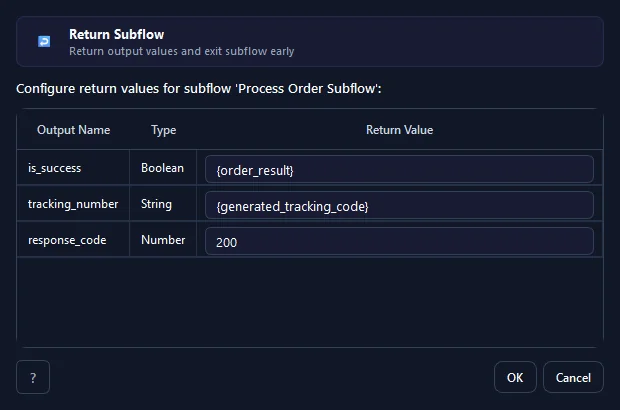
- In the Output Return Values table, declared output variables for this subflow will appear automatically.
- Enter literal values (numbers/strings/booleans) or variable tokens (e.g.,
{status_code},true,"success") into the Return Value column. - Click Save. During execution, reaching this command instantly stops the subflow and returns values to the caller.
Every option explained#
Expected result#
The subflow halts execution immediately at the Return Subflow step outputs are evaluated and caller advances.
Real example#
Example: Short-circuit on permission check failure#
- Inside Subflow "CheckAccount", insert IF condition: {is_locked} == true.
- Inside the IF block, place Return Subflow: {status} = "blocked", {can_proceed} = false.
- Subsequent heavy actions (opening web sessions, querying APIs) are skipped entirely.
- The caller receives the result and can alert the operator immediately.
Example: Fast return from an item search loop#
- Inside a For Each loop within a Subflow, check IF {item_id} == {target_id}.
- Add Return Subflow: {found} = true, {matched_index} = {index}.
- The subflow terminates immediately, returning the result to the caller without iterating remaining items.
- The caller reads the {found} variable to proceed with order updates.
Limitations and failure cases#
- Cannot be executed inside the Main flow doing so raises subflow invalid return in main.
- Only returns values for outputs declared in the Subflow Interface undeclared outputs cannot be dynamically introduced.
- Once Return Subflow triggers all subsequent commands within current subflow frame are bypassed.
- Referencing undefined variable tokens in return value fields causes a missing variable error.
- Return types must adhere to declared output schemas.
- It does not replace Stop Macro Return Subflow exits only active subflow not entire automation project.
Tips & common mistakes#
Verification details#
commands/subflow.pyui/subflow_command_dialog.py