RunMacro Documentation
Create your first robot, then go further as needed.
Clear step-by-step guides to create, run, and improve robots for repetitive computer work.
Call and Execute Subflow with Typed Parameters in RunMacro
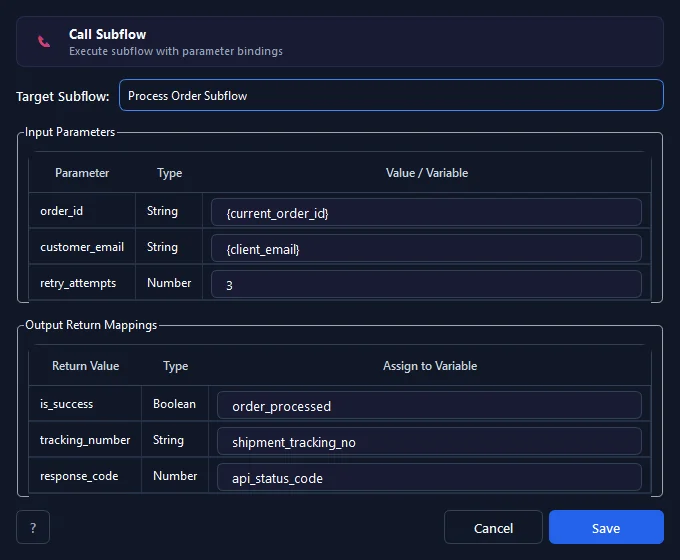
Call Subflow executes a defined modular subflow within the macro project, binding typed input parameters and mapping returned output variables back to the caller.
Prerequisites#
- At least one valid Subflow is created in the macro project via the Add Subflow tab.
- The target subflow is not the calling flow itself and does not form a circular recursive cycle.
- Caller source variables are initialized if dynamic values are bound to input parameters.
Supported modes#
- Desktop Mode — Executes desktop automation commands within the scoped subflow frame.
- Browser Mode — Executes browser/CDP commands inside the subflow frame without disrupting the session.
- RunMacro Runner — The runner seamlessly handles subflow frames and variable scope transitions.
What it does#
The Call Subflow command invokes and executes a pre-defined Subflow within the same macro project. During execution, RunMacro creates an isolated execution frame for the subflow, passing values or variables from the caller into the subflow's declared Input Parameters with typed bindings. When the subflow finishes (or encounters an early Return Subflow), the resulting outputs are automatically mapped back into target variables in the caller's scope. The runtime features built-in static and dynamic call graph cycle detection to prevent direct self-calls and circular recursion deadlocks.
Screenshots & video#
When to use it#
- Reusing repeated automation routines (such as logging in, solving captchas, audit logging, or formatting data) without copying commands.
- Modularizing large, complex workflows into clean, isolated functional blocks that can be maintained and tested independently.
- Executing parameterized functional procedures with typed inputs and returning structured outputs without polluting global variables.
When not to use it#
- Simple linear in-flow jumps without scoping needs.
- Executing separate external macro files on disk.
- Repeating a simple command sequence iteratively in place.
Configuration steps#
- Create the target Subflow via the + Add Subflow tab or Subflow Interface editor in RunMacro.
- In your calling flow (Main or another Subflow), add the Control Flow › Call Subflow command.
- In Target Subflow, select the target subflow from the dropdown (recursive circular targets are automatically filtered out).
- In the Input Parameters table, enter literal values or bind caller variables (e.g.,
{username},{row_id}). - In the Output Return Mappings table, assign each subflow return output to a destination variable in the caller.
- Click Insert / Save to finalize.
Every option explained#
Expected result#
The target subflow runs through its commands returning control and output values to the caller.
Real example#
Example: Call "Login" Subflow with credentials and return status#
- Define Subflow "Login" with inputs {user}, {pass} and output {is_logged_in}.
- In Main flow, add Call Subflow targeting "Login".
- Bind inputs: {user} = {current_account}, {pass} = {secure_password}.
- Map output: {is_logged_in} into variable {login_success}.
- Branch with IF condition: if {login_success} == true, proceed with workflow.
Example: Call data calculation subflow in batch processing#
- Define Subflow "CalculateFee" taking {amount} (Number) and returning {fee} and {total}.
- Inside a data row loop, invoke Call Subflow with {amount} = {order_amount}.
- Map output {total} to {final_charge} to write to the invoice CSV.
- Verify the logged file output to confirm customer charges match expected fees.
Limitations and failure cases#
- Maximum call depth is capped at 32 frames exceeding this threshold triggers a stack overflow error.
- Local variables declared in a subflow exist only during its execution frame and cannot be accessed by the caller unless mapped via outputs.
- Direct self-calls and mutual recursion cycles are strictly prohibited and blocked by the dialog and runner.
- If the target subflow is deleted or renamed externally the command reports a missing target error.
- Bound input types must match the target parameter specifications.
- Only in-project subflows within the active pmacro file are callable external files require package commands.
Tips & common mistakes#
Verification details#
commands/subflow.pyui/subflow_command_dialog.py