RunMacro Documentation
Create your first robot, then go further as needed.
Clear step-by-step guides to create, run, and improve robots for repetitive computer work.
Break out of an active loop immediately in RunMacro
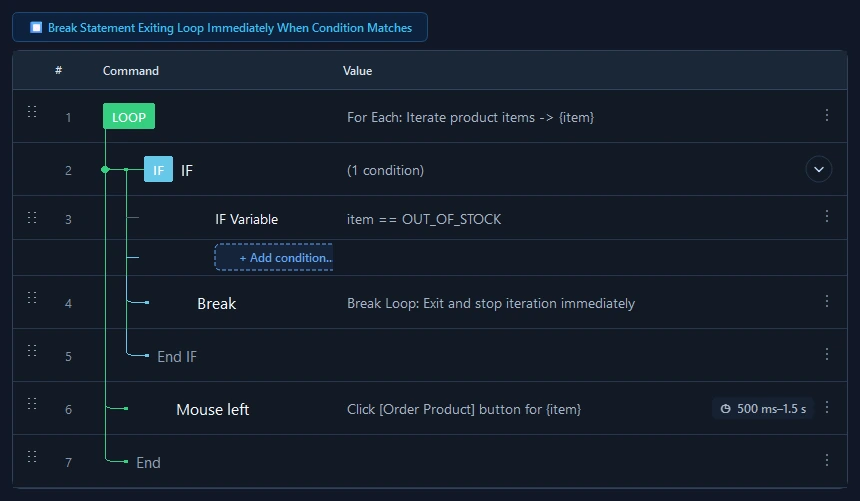
The Break command instantly exits the active enclosing loop (While, For Each, Loop) and advances execution past End Loop.
Prerequisites#
- Break must be positioned inside a valid loop block (Loop, While, or For Each).
- Typically enclosed in an IF condition to determine the appropriate exit timing.
Supported modes#
- Desktop Mode
- Browser Mode
- RunMacro Runner
What it does#
The Break Loop command immediately terminates the innermost enclosing loop block (supporting Loop N times, While, or For Each). Upon execution, all remaining actions in the loop are bypassed and control transfers directly to the first command past the matching End Loop (or legacy End If). It provides a clean, structured mechanism for early loop termination without convoluted Goto labels.
Screenshots & video#
When to use it#
- Searching collections: exiting immediately once a target item, image, or value is located.
- Encountering critical errors during an iteration where halting the whole batch is required for safety.
- Satisfying an early completion condition inside complex While or For Each loops.
When not to use it#
- Skipping only the current cycle to start the next iteration (use Continue instead).
- Returning from a sub-macro back to the parent macro (use Goto Parent File).
Configuration steps#
- Identify the condition check point inside the active loop body.
- Place a conditional check (such as an IF or Find Image command).
- Inside the condition true branch, insert Control Flow › Break Loop.
- Save workflow. When the condition evaluates to true, Break jumps execution past the loop boundary.
Every option explained#
Expected result#
The loop halts immediately at the Break call and execution continues with the command following the loop block.
Real example#
Example: Search list items and break on match#
- For Each loop iterating over file rows.
- IF check: if {item} == "TARGET_ID".
- Inside IF: insert Break Loop command.
- After End Loop: display success notification that target was found.
Limitations and failure cases#
- Break only affects the local synchronous execution thread; background threads cannot be halted via Break.
- Corrupted loop hierarchies missing an End Loop boundary will prevent the runner from locating the exit target safely.
Tips & common mistakes#
Verification details#
commands/control_flow.py