RunMacro Documentation
Create your first robot, then go further as needed.
Clear step-by-step guides to create, run, and improve robots for repetitive computer work.
Conditional While Loop block in RunMacro
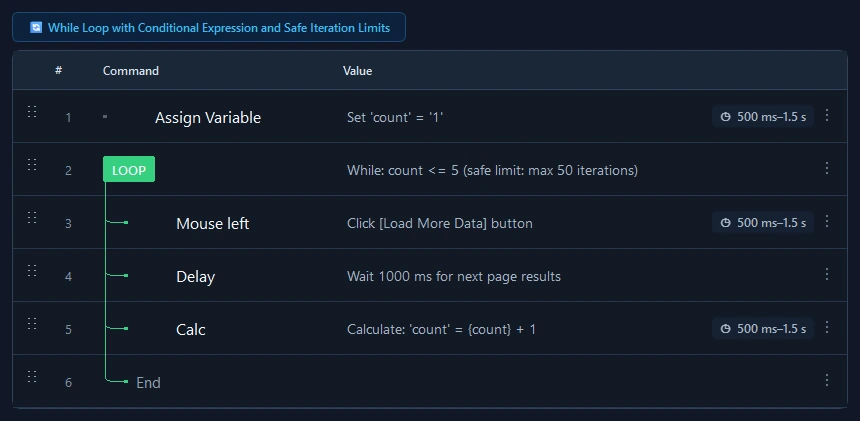
While Loop repeatedly executes child commands as long as a variable condition remains met, protected by a safety iteration cap.
Prerequisites#
- The monitored variable is initialized prior to entering the loop.
- A defined termination condition exists so the loop does not exhaust its safety cap unintentionally.
Supported modes#
- Desktop Mode
- Browser Mode
- RunMacro Runner
What it does#
The While Loop command repeatedly executes enclosed commands as long as a logical comparison between a variable and a reference value evaluates to TRUE. Before every iteration, RunMacro re-checks the expression; as soon as the condition turns FALSE or a Break command is met, execution exits past the matching End Loop. A built-in maximum iteration safety cap guards against infinite hanging.
Screenshots & video#
When to use it#
- Polling an asynchronous operation whose completion duration is variable (e.g. while {status} != "Done").
- Processing sequential queue items until a pointer or balance threshold is reached.
- Retrying an operation sequence while checking success conditions after each cycle.
When not to use it#
- Iterating through collections of files or list items (For Each is much better).
- Repeating an action a predetermined fixed number of times (use Loop instead).
Configuration steps#
- Add a Control Flow › While Loop command to your workflow.
- Select the target variable to monitor (e.g.
{status}). - Select comparison operator (
!=,==,<,contains...) and enter the target value. - Set the Safety Cap (Max Iterations) threshold (e.g. 100) to protect against infinite loops.
- Place target commands inside the block. Terminate with End Loop. Save.
Every option explained#
Expected result#
Enclosed commands repeat on each cycle until the condition evaluates to false, then flow advances past End Loop.
Real example#
Example: Poll until processing status changes to "Ready"#
- Initialize variable {status} = "Processing".
- Insert While: {status} != "Ready", Max Iterations = 50.
- Inside: Re-read status from UI, Delay 1000ms.
- Close with End Loop. When {status} equals "Ready", the loop exits immediately.
Limitations and failure cases#
- If the variable is never updated inside the block, the loop will consume all iterations up to the safety cap.
- Cycle interval timing depends entirely on the execution speed and delays of child commands inside the block.
Tips & common mistakes#
Verification details#
commands/control_flow.py