RunMacro Documentation
Create your first robot, then go further as needed.
Clear step-by-step guides to create, run, and improve robots for repetitive computer work.
Skip to next loop iteration with Continue in RunMacro
The Continue command skips remaining steps in the active cycle and transitions directly to the next loop iteration.
Prerequisites#
- Continue must reside within an active loop structure (Loop, While, or For Each).
- Placed within a conditional branch to avoid unintentionally skipping every iteration cycle.
Supported modes#
- Desktop Mode
- Browser Mode
- RunMacro Runner
What it does#
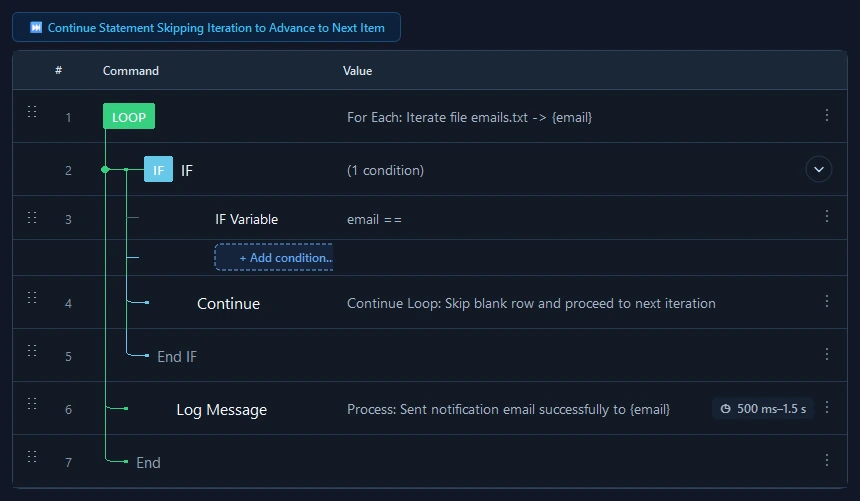
The Continue Loop command bypasses all subsequent instructions in the active cycle of the innermost loop (While, For Each, or Loop N times). Execution transfers directly back to the top of the loop to fetch the next collection item or re-evaluate iteration conditions. It provides an elegant pattern for skipping blank rows, invalid entries, or irrelevant cases without aborting the entire process.
Screenshots & video#
When to use it#
- Bypassing empty rows or table header lines when iterating files in For Each.
- Skipping disabled or locked accounts while continuing normal processing for the remaining items.
- Omitting time-consuming sub-steps when an optional condition is not met in the active iteration.
When not to use it#
- Terminating and halting the entire loop permanently (use Break instead).
- Temporarily pausing execution for user input (use Pause instead).
Configuration steps#
- Place a conditional check (such as an IF testing for empty text or skip status).
- Inside the true branch, insert Control Flow › Continue Loop.
- Place primary processing actions below the IF check.
- Close the loop with End Loop. When Continue is executed, remaining steps are skipped cleanly.
Every option explained#
Expected result#
Subsequent commands in the active iteration are skipped and the loop immediately advances to the next iteration cycle.
Real example#
Example: Skip empty rows when processing email list#
- For Each loop reading lines from emails.txt.
- IF check: if {item} is empty (is_empty).
- Inside IF: call Continue Loop.
- Below IF: send email to {item}.
- Close with End Loop.
Limitations and failure cases#
- In a While loop, if the monitored variable is not updated prior to Continue, the loop may loop infinitely until hitting the safety cap.
- Applies strictly to the innermost loop boundary when nested structures are used.
Tips & common mistakes#
Verification details#
commands/control_flow.py