
Click by coordinates on an extension popup (CDP)
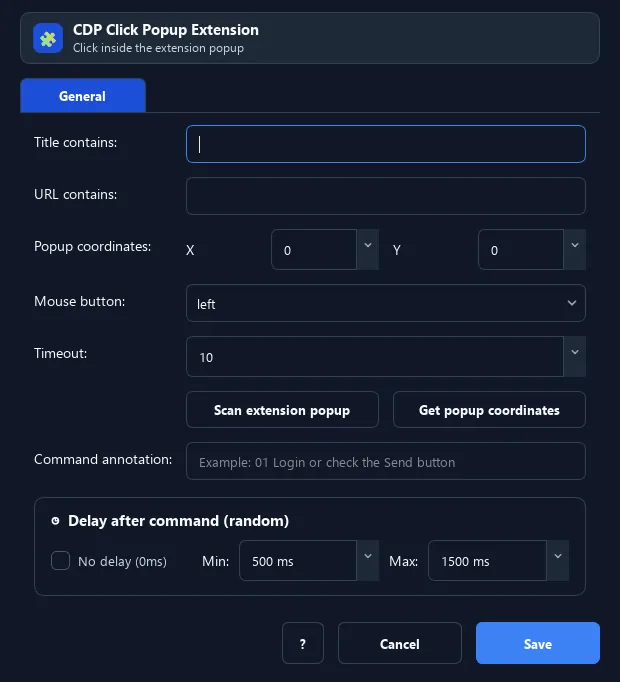
The Click Extension Popup command finds an extension popup window (by title/URL) then clicks at X, Y inside it.
Prerequisites#
- Add Click Extension Popup to the macro.
- Prepare the data or target that Click Extension Popup will use.
Supported modes#
- Browser Mode
What it does#
The Click Extension Popup command finds an extension popup window (by title/URL) then clicks at X, Y inside it. Useful when the popup is hard to target by selector.
Screenshots & video#
When to use it#
- Click Confirm/Approve on a wallet popup when there is no selector.
- Quickly act on a popup with a fixed layout.
When not to use it#
- Do not use it with unstable popup selectors or inaccessible content contexts.
Configuration steps#
- Add Browser › Click Extension Popup.
- Enter Title/URL contains to match the popup and the X, Y to click.
- Choose the mouse button and timeout. Save.
Every option explained#
Expected result#
After execution, Click Extension Popup completes the described action and makes its result available to the next step.
Real example#
Example: confirm a transaction#
- Click Extension Popup: URL contains
notification, X=210, Y=560 (Confirm button). - Delay 1000ms then continue.
Limitations and failure cases#
- Click can immediately close the popup; DOM changes, iframe/shadow context, and timing can stale the selector.
Tips & common mistakes#
Fixed coordinates break when the popup resizes. If the popup has selectors, prefer Select Popup + Smart HTML over coordinate clicks.
Verification details#
commands/browser.py